웽양 공업구 웨칭 원저우 325000
근무 시간
월요일~금요일: 오전 7시~오후 7시
주말: 주말: 오전 10시 - 오후 5시
웽양 공업구 웨칭 원저우 325000
근무 시간
월요일~금요일: 오전 7시~오후 7시
주말: 주말: 오전 10시 - 오후 5시

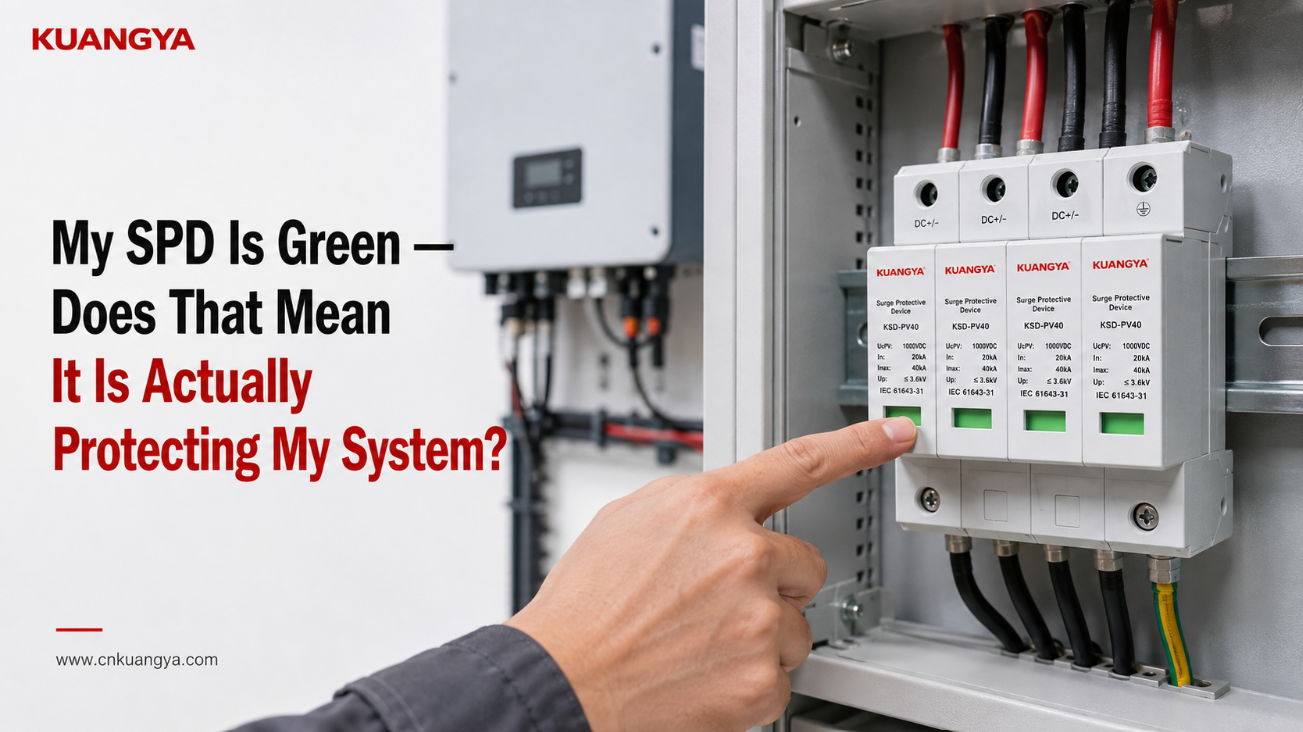
태양광 분전반을 열고 서지 보호 장치를 확인했을 때 녹색 표시등이 켜져 있는 것을 보게 됩니다. SPD 녹색 표시등이 정상으로 보이지만, 이것이 시스템이 실제로 보호되고 있다는 것을 의미할까요?
모든 것이 정상으로 보입니다.
그렇다면 SPD가 인버터와 나머지 태양광 발전 시스템을 확실하게 보호하고 있다는 뜻일까요?
꼭 그렇지는 않습니다.
많은 모듈형 서지 보호 장치에서 녹색 상태 표시등은 모니터링되는 SPD 모듈이 제조사가 정의한 정상 또는 사용 가능한 상태임을 의미합니다. 간단히 말해, 장치 내부의 보호 소자가 분리나 교체가 필요한 고장 상태에 도달하지 않았음을 나타냅니다.
그러나 그 녹색 표시등이 보호 시스템의 모든 것을 보장할 수는 없습니다.
SPD가 올바르게 선정되었는지, 배선이 정확한지, 연결 경로가 너무 길지는 않은지, 접지 및 본딩 구성이 적절한지, 또는 이전 서지 발생 후 잔여 서지 처리 용량이 얼마나 남았는지는 확인할 수 없습니다.
녹색 표시창을 이해하는 가장 안전한 방법은 다음과 같습니다:
녹색은 일반적으로 SPD가 고장을 보고하지 않았음을 의미합니다. 이는 서지 보호 시스템의 모든 부분이 검증되었음을 의미하지는 않습니다.
이러한 구분은 태양광 PV 시스템에서 특히 중요하며, 직류(DC) 전압, SPD 구성, 케이블 배선, 인버터 위치, 접지 구성 및 설치 방식이 모두 실제 서지 보호 성능에 영향을 미칩니다.
제조사가 정의한 SPD의 경우 녹색은 정상 상태를 의미함:
| 확인 사항 | 일반적으로 나타내는 의미 | 증명하지 않는 사항 |
|---|---|---|
| 녹색 표시기 | 모니터링되는 SPD 모듈이 정의된 고장/수명 종료 상태를 나타내지 않음 | 올바른 설치 |
| 모든 모듈 녹색 | 육안으로 확인 가능한 모든 모니터링 모듈이 정상 상태를 보고함 | 올바른 SPD 선정 |
| 인버터가 정상 작동 중입니다 | 전력 변환이 작동 중입니다 | SPD가 효과적인 서지 보호 기능을 제공하고 있습니다 |
| 뇌우 발생 후 녹색 상태 유지 | 모니터링되는 단로기에서 오류가 보고되지 않았습니다 | 서지가 발생하지 않았습니다 |
| 수년간 사용 후에도 녹색 상태 유지 | 모니터링되는 모듈에서 오류가 발생하지 않았습니다 | 전체 초기 서지 용량이 유지됨 |
| 녹색 표시창 + 알람 없음 | 현재 보고된 모니터링 오류 없음 | 올바른 접지, 본딩, 배선 또는 협조 |
정확한 의미는 항상 특정 SPD의 데이터시트나 설치 지침을 통해 확인해야 함.
이것이 중요한 이유는 녹색과 적색은 일반적인 표시 색상이지만, 시중의 모든 SPD에 적용되는 보편적인 진단 언어는 아님.
일부 SPD는 기계식 색상 표시창을 사용함. 다른 제품들은 LED, 기호, 원격 접점, 가청 알람 또는 전자 모니터링 방식을 사용함.
예를 들어, 일부 상업용 SPD는 로컬 녹색/적색 상태 표시와 함께 원격 신호 기능을 사용합니다..
따라서 색상을 해석하기 전에 먼저 제조업체가 정의한 의미를 확인하십시오.
많은 최신 모듈형 SPD는 금속 산화물 배리스터(MOV)와 같은 보호 소자 및 차단 메커니즘을 포함하고 있습니다.
정상 작동 중에 MOV 기반 SPD는 고임피던스 상태를 유지합니다.
과도 과전압이 발생하면 보호 소자가 도통 상태가 되어 서지 전류를 우회시킵니다. 설계된 보호 경로를 통해 민감한 장비에 도달하는 전압을 제한하는 데 도움을 줍니다.
시간이 지남에 따라 반복적인 전기적 스트레스, 비정상적인 과전압 또는 충분히 심각한 이벤트가 발생하면 보호 소자의 성능이 저하될 수 있습니다.
따라서 많은 SPD 설계에는 정의된 위험 상태나 고장 상태에 도달한 보호 요소를 분리하기 위한 내부 차단 메커니즘이 포함되어 있습니다.
육안 확인용 상태 표시기는 종종 이러한 모니터링 또는 차단 시스템과 기계적 또는 전기적으로 연결되어 있습니다.
이러한 유형의 SPD의 경우:
녹색은 다음을 나타낼 수 있습니다:
모니터링되는 보호 모듈이 여전히 연결되어 있으며 제조업체가 정의한 고장 상태에 도달하지 않았음을 의미합니다.
적색은 다음을 나타낼 수 있습니다:
모니터링되는 보호 요소가 차단되었거나 모듈이 교체가 필요한 상태에 도달했음을 의미합니다.
그러나 정확한 동작 방식은 SPD 설계에 따라 다릅니다.
그렇기 때문에 다음과 같이 표현하는 것이 더 좋습니다:
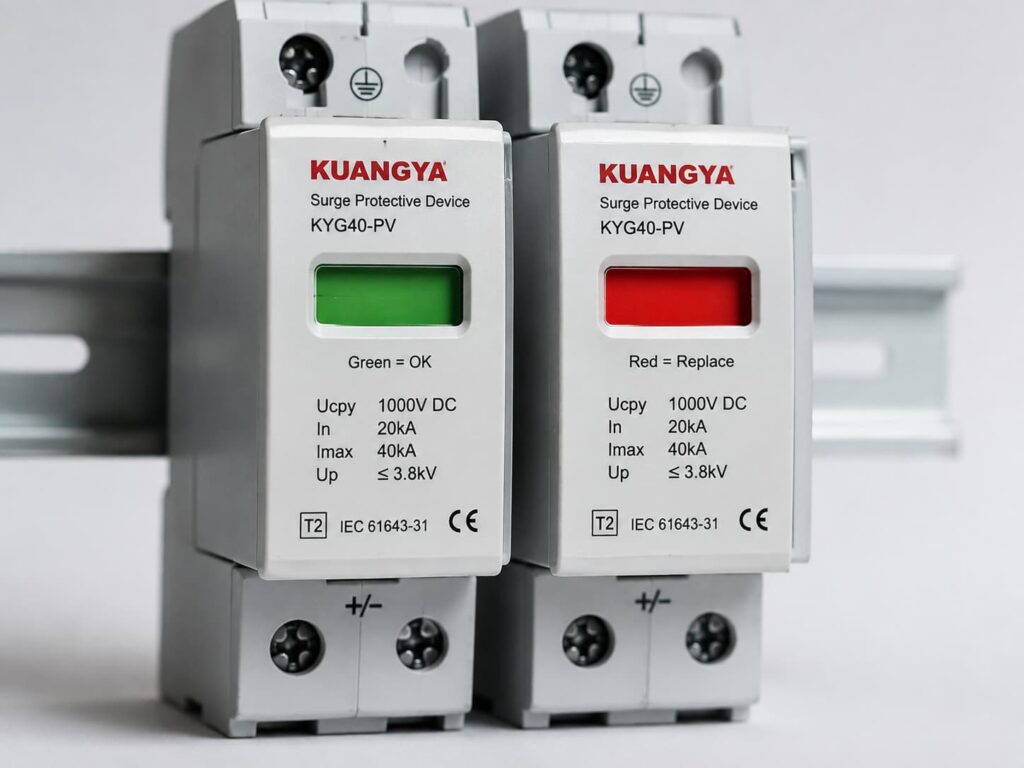
녹색 = 모듈이 현재 정상 상태임을 보고함.
다음보다는:
녹색 = 전체 전기 시스템이 확실하게 보호됨.
사소한 세부 사항처럼 들릴 수 있지만, 이는 불필요한 혼란을 야기합니다.
많은 DIN 레일형 SPD에는 실제로 녹색 LED가 포함되어 있지 않습니다.
카트리지 전면에 보이는 녹색 사각형은 단순히 기계식 상태 표시창일 수 있습니다..
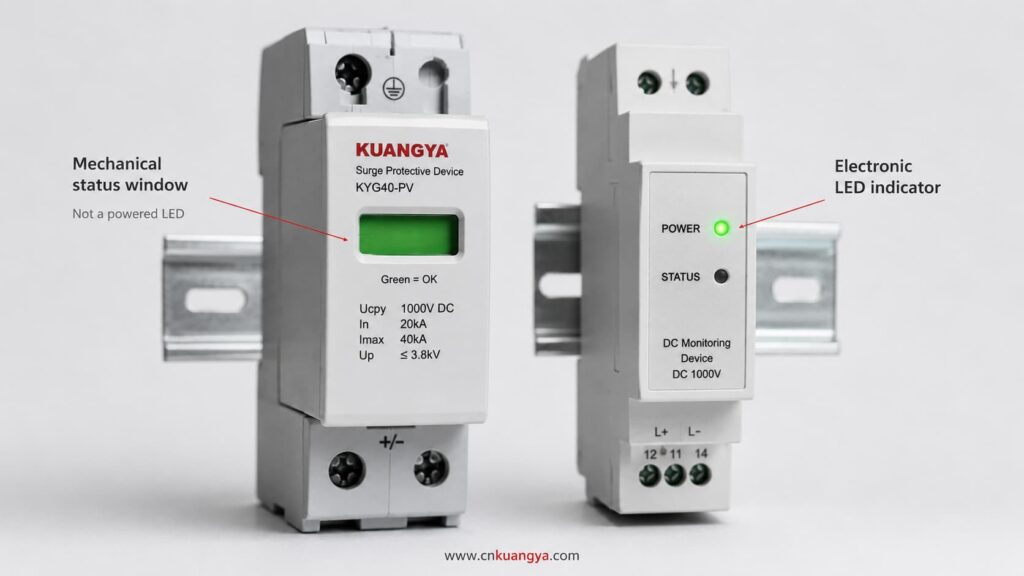
예를 들어, 내부 차단기가 작동하면 SPD 내부의 메커니즘이 색상이 있는 플래그를 이동시킬 수 있습니다.
이는 전기 시스템의 전원이 차단된 상태에서도 표시창이 계속 보일 수 있음을 의미합니다.
따라서 다음과 같은 진술은:
“녹색 불이 켜져 있으므로 SPD에 전원이 공급되고 있다.”
잘못된 것일 수 있습니다.
기계식 녹색 창은 공급 전압의 존재 여부가 아닌 SPD 모듈의 물리적 상태를 나타낼 수 있습니다.
제품이 다음 중 무엇을 사용하는지 항상 확인하십시오:
제품 설명서에 이 내용이 명시되어 있어야 합니다.
이는 이해해야 할 가장 중요한 사항 중 하나입니다.
대부분의 일반적인 전력 시스템 애플리케이션에서 SPD는 병렬로 보호 대상 회로와 연결됩니다.
일반적으로 인버터의 정상 작동 전류를 흐르게 하지 않습니다.
정상 전압 조건에서 SPD는 대부분 비활성 상태를 유지합니다.
과도 과전압이 발생하면 서지 전류 경로를 제공하고 설계에 따라 전압을 제한합니다.
이러한 병렬 배치로 인해 메인 회로가 계속 작동하는 동안에도 SPD 보호 모듈은 분리될 수 있습니다.
그 결과는 다음과 같을 수 있습니다:
인버터: 정상 작동
태양광 발전: 정상
SPD 모듈: 고장 또는 분리됨
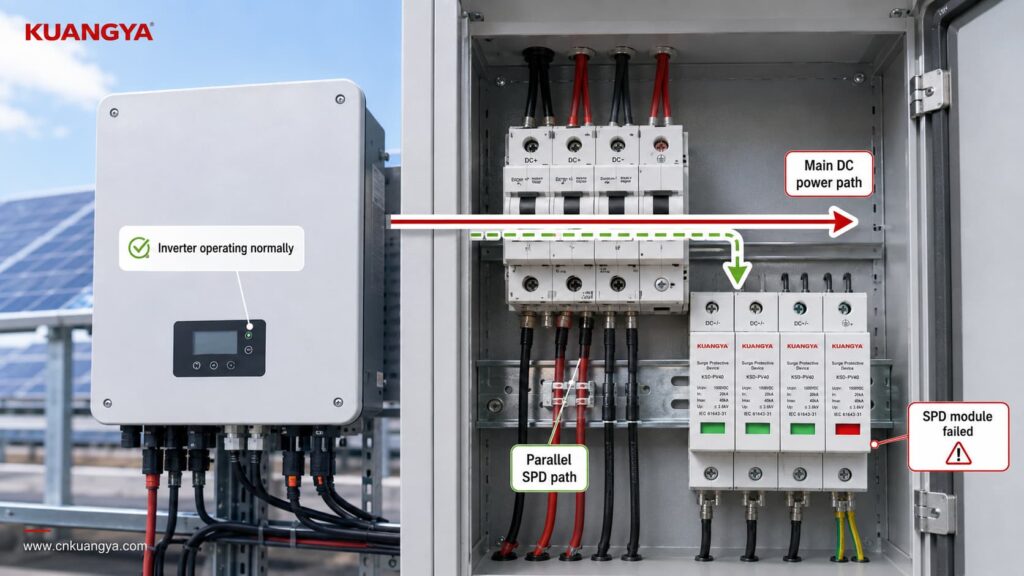
이것이 인버터의 작동 여부만 확인해서는 서지 보호 기능이 여전히 유효한지 알 수 없는 이유입니다.
태양광 시스템은 하나의 서지 보호 경로가 손실된 후에도 계속해서 전력을 생산할 수 있습니다.
바로 그 점이 상태 표시기가 중요한 이유입니다.
하지만 그 반대의 경우도 마찬가지입니다:
A green indicator does not prove that the complete surge protection arrangement is correct.
Think of the indicator as answering one narrow question:
Has the monitored SPD module entered the failure state that this indicator is designed to detect?
It is not answering every engineering question about the installation.
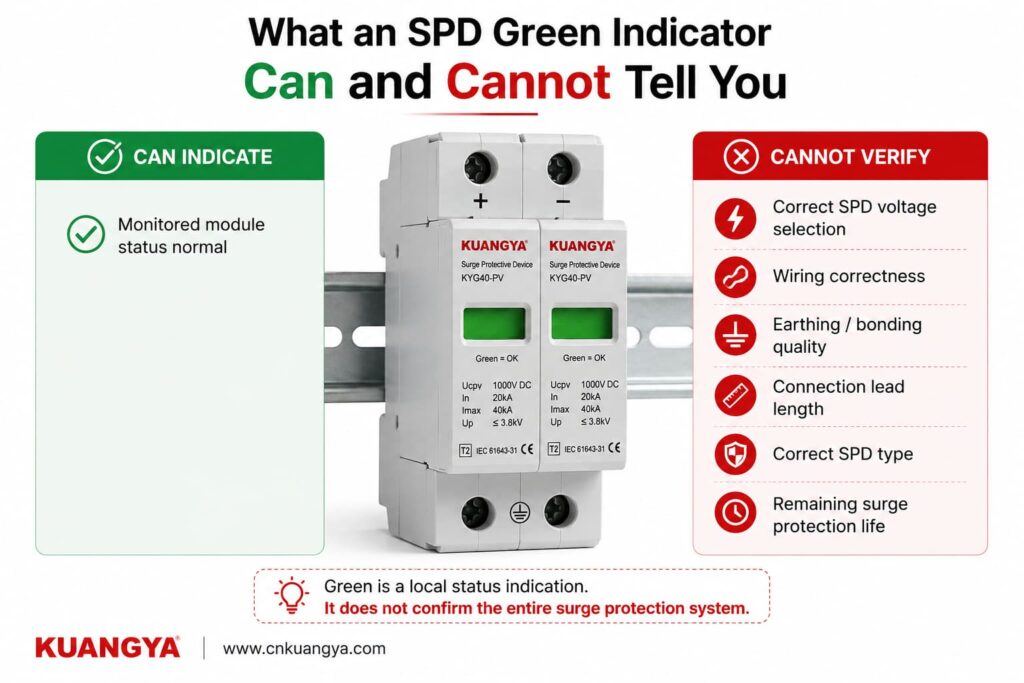
The module has not reached its manufacturer-defined indicated failure state.
The internal disconnection/status mechanism has not reported the condition associated with replacement.
The module is not currently displaying its normal visual failure warning.
Whether the SPD voltage rating is suitable for the PV array.
Whether the SPD is intended for AC or DC operation.
Whether the correct Type 1, Type 2 or combined Type 1+2 protection has been selected.
Whether the voltage protection level is suitable for the equipment being protected.
Whether the SPD is wired according to the correct PV configuration.
Whether all protection modes are connected correctly.
Whether the earthing and equipotential bonding arrangement is correct.
Whether the SPD connection conductors are unnecessarily long.
Whether the required backup overcurrent protection is correct.
Whether a previous surge has reduced the remaining capability of the protection element.
Whether a surge event has occurred.
Whether the SPD would perform exactly as declared during the next transient event.
That is why a green indicator should be treated as one inspection point, not as a complete SPD test.
If the SPD is green, the next question should not be:
“Is everything perfect?”
더 나은 질문은 다음과 같습니다.
“Does the rest of the installation support the protection that this SPD is designed to provide?”
Here are the most important checks.
Never assume the color meaning only from experience with another brand.
Check the:
For many modular SPDs, green means normal and red means replacement or fault.
But that interpretation should still come from the documentation of the exact product.
This becomes particularly important with multi-function products that may have separate indicators for:
A green indicator is only useful if you know exactly what it is indicating.
A multi-pole SPD can contain several protection modules or protection paths.
For example, a PV SPD assembly may have several cartridges depending on the system topology and protection arrangement.
If three windows are green but one is red, you should not describe the SPD as:
“Basically OK.”
One failed protection path may mean the complete intended protection arrangement is no longer available.
Check every visible status indicator.
For plug-in designs, also make sure the required cartridges are present and correctly installed according to the manufacturer’s instructions.
If one module shows the manufacturer’s defined failure condition, follow the manufacturer’s replacement procedure and investigate whether any additional inspection is required.
A perfectly green SPD can still be the wrong SPD.
This is one of the biggest reasons that green does not equal correctly protected.
For a solar PV installation, check whether the SPD is specifically suitable for the DC side of a photovoltaic system.
IEC 61643-31 addresses SPDs intended for the DC side of PV installations up to 1500 V DC.
The SPD should therefore be selected according to the actual system rather than simply according to appearance or nominal voltage.
Important parameters may include:
System application
AC SPD and PV DC SPD are not automatically interchangeable.
최대 연속 동작 전압
For PV SPDs, the selected continuous voltage rating must be suitable for the maximum voltage that can occur in the PV circuit under the applicable design conditions.
Voltage protection level — Up
A lower Up generally means a lower declared residual voltage during the specified test conditions, but it must be considered together with system voltage, SPD type and coordination.
Discharge current ratings
Depending on the SPD classification, datasheets may specify values such as In, Imax or Iimp.
SPD 유형
If these markings are unfamiliar, see our guide to DC SPD specifications such as Ucpv, In, Imax, Up and Iscpv.
Whether Type 1, Type 2 or a combined Type 1+2 SPD is appropriate depends on the installation, lightning exposure, lightning protection concept and applicable standards.
A green Type 2 SPD cannot turn itself into a Type 1 SPD simply because the indicator looks normal.
Correct application still matters.
An SPD only works through the electrical paths actually connected to it.
A green indicator cannot detect every wiring error.
In a PV installation, the SPD connection must match the system architecture and the manufacturer’s wiring diagram.
Do not assume that every DC SPD is wired identically.
Different products and PV system configurations can use different protection arrangements.
Incorrect connections can result in a situation where:
The SPD itself appears normal, but the surge protection path is not the path the system actually needs.
Polarity, protection modes, terminal identification and connection to PE or the relevant equipotential bonding system must follow the device instructions and system design.
The front indicator usually does not verify all of these installation details.
Even when an SPD is correctly selected and still green, installation geometry matters.
During a surge, current changes extremely quickly.
The inductance of the connecting conductors can therefore create additional voltage.
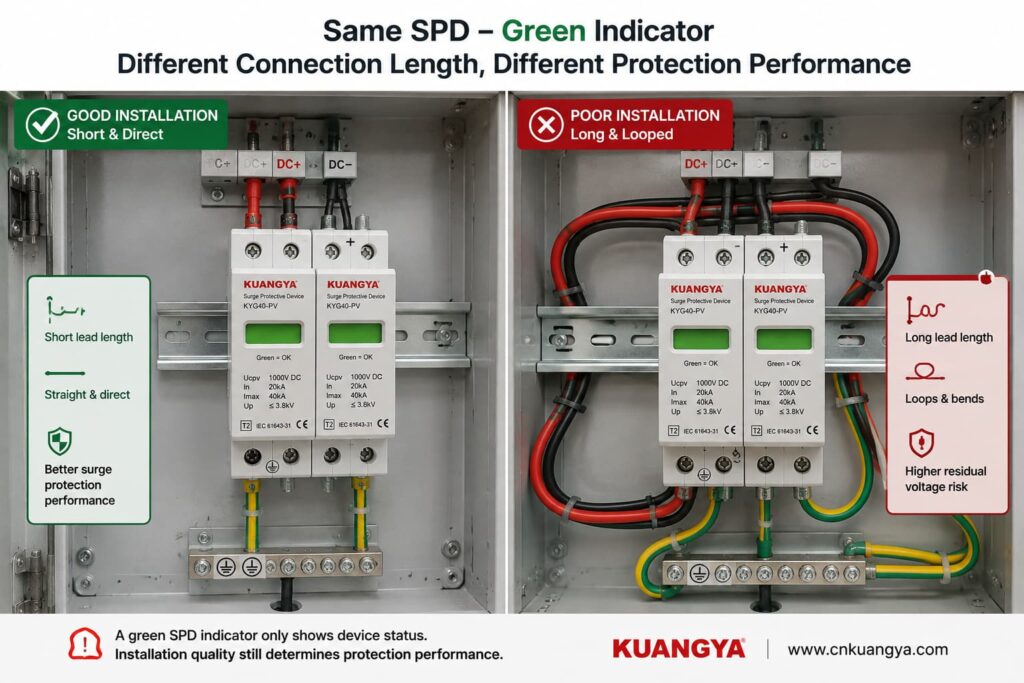
Long, looping or poorly routed SPD conductors can increase the voltage appearing at the protected equipment during a transient.
This means two identical green SPDs can provide different real installation performance if one has short, direct connections and the other is connected using unnecessarily long conductors.
This is why SPD installation instructions commonly emphasize short and direct connections.
따라서:
Green tells you about the monitored SPD module. It does not tell you whether the wiring around the SPD is optimized for surge performance.
If you want to understand this issue in more detail, see our guide:
An SPD does not work in isolation.
The complete surge-current path matters.
Depending on the system topology and SPD design, this can involve PE conductors, bonding conductors, equipotential bonding and the installation’s earthing arrangement.
A green SPD indicator usually does not verify the quality of those external connections.
Possible installation problems can include:
loose connections,
corroded connections,
incorrect bonding,
poor conductor routing,
connection to the wrong reference point,
or an installation arrangement that does not match the SPD wiring diagram.
For solar PV systems, the correct earthing and bonding arrangement depends on the system design and applicable installation requirements.
Therefore, avoid the overly simple statement:
“An SPD just sends everything into the ground.”
The real current paths depend on SPD topology and system configuration.
What matters is that the SPD is installed according to its declared protection modes and the applicable electrical design.
Depending on the product and installation, the SPD manufacturer may specify backup overcurrent protection or coordination requirements.
A green window does not confirm that the required upstream protective device has been selected correctly.
Check the exact product instructions.
Also inspect the SPD externally where this can be done safely.
Warning signs include:
Visible damage should not be ignored simply because the status window still appears green.
Where inspection requires opening energized equipment or accessing hazardous terminals, the work should be performed by qualified personnel following appropriate electrical safety procedures.
An SPD green indicator is useful, but it is only one part of the picture.
Use the checker below as a basic installation review, not as an electrical test or certification of the SPD.
Answer these quick questions to review the basic condition of your SPD installation.
Does the manufacturer documentation confirm that green means normal / available for this SPD?
Are all required SPD modules showing their normal status?
Is the SPD suitable for the actual application and system voltage, such as PV DC use where applicable?
Has the SPD wiring been checked against the manufacturer’s connection diagram?
Are the SPD connection conductors kept short and direct according to the installation instructions?
Has the required earthing / bonding arrangement been checked?
Is the SPD free from visible signs of burning, cracking, deformation or overheating?
The result should be treated as an inspection prompt.
It cannot reproduce an IEC surge test, measure remaining MOV life or guarantee protection against a future lightning event.
This is another very common misunderstanding.
Imagine that a thunderstorm passes near the PV installation.
The inverter continues operating.
You inspect the SPD.
It is still green.
Does this mean the surge never reached the system?
아니요.
A surge can occur without forcing the SPD into its failure state.
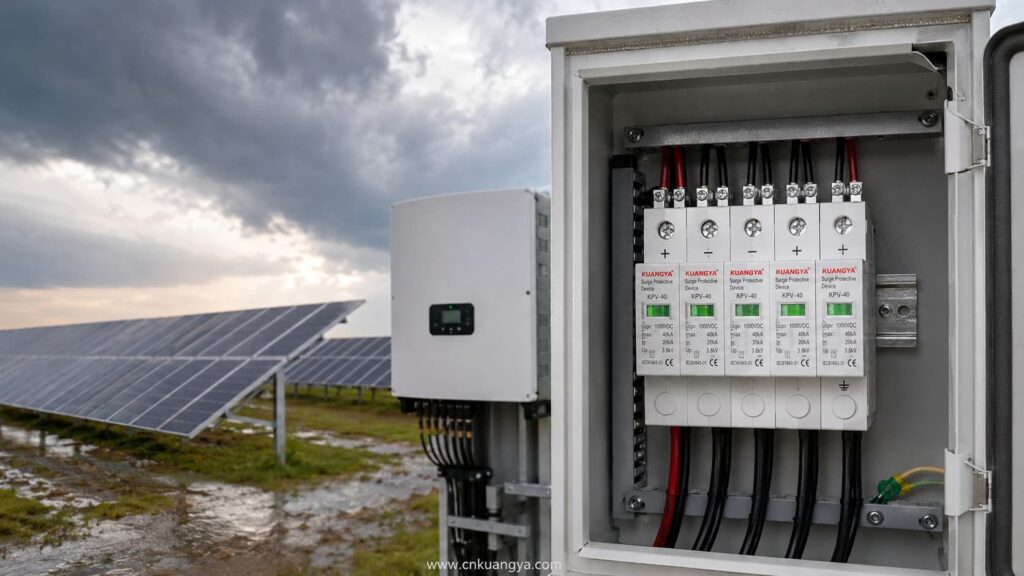
That is the purpose of an SPD: it is designed to withstand and handle transient events within its declared capabilities.
So an SPD may experience a surge, perform its protective function and remain in its normal indicated state afterward.
The green indicator is not normally an event counter.
It does not necessarily tell you:
Some more advanced monitoring systems can record surge events or estimate device condition.
A basic green/red status window usually cannot.
따라서
Green after a storm does not prove that nothing happened. It only tells you that the SPD has not entered the failure state represented by that indicator.
For important or critical systems, follow the manufacturer’s inspection recommendations after significant electrical or lightning events.
Potentially, yes.
This is one of the reasons not to describe the green window as a complete health measurement.
MOV-based surge protective elements can experience cumulative electrical stress.
The amount of degradation depends on factors such as:
However, this does not mean that you can calculate SPD life simply by counting thunderstorms.
There is no reliable universal rule such as:
“An SPD survives exactly 20 surges.”
또는:
“Replace every SPD after three years.”
Surge exposure is not identical from event to event.
A large event and a small transient do not impose the same electrical stress.
The green/red mechanism is usually a threshold-type status indication, not a precise remaining-life meter.
More sophisticated monitoring systems can provide additional condition information, but a basic mechanical indicator normally cannot show a percentage such as:
SPD life remaining: 63%.
So avoid any tool or article claiming to calculate exact SPD remaining life from only age, number of storms or visual indicator color.
아니요.
It is better to say that the monitored SPD has not reached the condition that causes its status mechanism to indicate failure.
That is different from saying the protection element is identical to a brand-new component.
The SPD may have experienced previous stress without reaching its disconnection threshold.
For normal installations, this does not automatically mean the SPD must be replaced.
The important point is simply that the green indicator is not a laboratory measurement of every electrical characteristic inside the SPD.
A normal multimeter can be useful for certain electrical checks, but it cannot fully verify surge-protection performance.
A standardized SPD test involves transient conditions that an ordinary handheld multimeter does not reproduce.
For example, a multimeter does not apply standardized surge-current waveforms to determine parameters such as the SPD’s declared voltage protection level or impulse-current performance.
For many MOV-based SPDs, measuring resistance at the low voltage produced by a multimeter may simply show a very high resistance or open-circuit-like reading.
That alone does not prove the SPD will perform correctly during a surge.
Similarly:
Continuity = good SPD
is not a universal test rule.
For products with a remote signaling contact, a meter may sometimes be used to check that contact when the manufacturer permits it and the circuit is safely isolated.
But the remote contact still only reports the status designed into the device.
It does not perform a full surge test.
For installed SPDs, follow the manufacturer’s inspection and testing procedure.
Some SPDs include a dry contact or changeover contact for remote status monitoring.
This is useful in:
The remote contact can be connected to monitoring equipment such as a PLC, BMS, inverter monitoring system or SCADA system.
If the SPD changes to its defined fault condition, the remote contact can trigger an alarm.
This solves an important practical problem:
Without remote monitoring, a failed SPD may remain unnoticed inside a cabinet for a long time.
However, remote signaling has the same fundamental limitation as the local indicator.
It can report the condition the SPD is designed to monitor.
It normally does not automatically tell you:
So remote monitoring improves visibility, but it does not replace correct engineering.
A green SPD deserves further inspection when something else about the installation creates doubt.
예를 들면 다음과 같습니다:
Follow the equipment manufacturer’s post-event inspection instructions.
A previously correct SPD can become poorly coordinated after changes to the PV array, inverter, distribution board, cabling or protection scheme.
Check the product data rather than relying on the green indicator.
Review SPD placement and connection length.
Do not let a green window override obvious physical warning signs.
Repeated SPD failure may indicate a system problem such as incorrect voltage selection, temporary overvoltage, wiring problems or abnormal electrical stress.
Simply installing another identical cartridge repeatedly is not a root-cause solution.
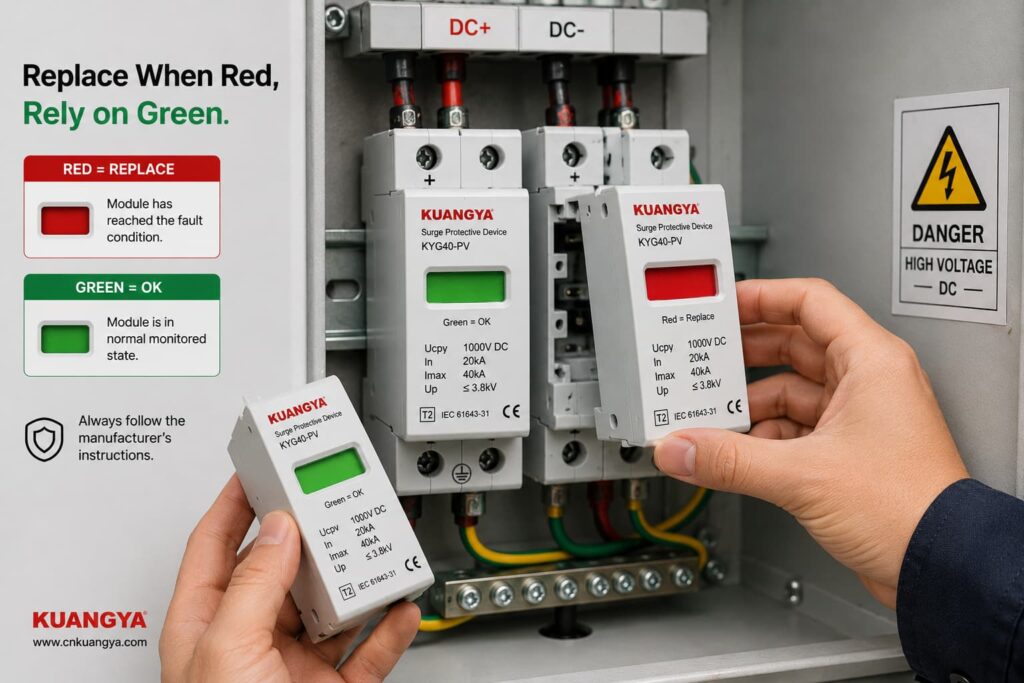
The clearest replacement condition is when the manufacturer-defined status indicator shows that the module has failed or reached end of life.
For many replaceable modular SPDs, this is shown by a red status window.
For solar PV applications, you can also view our DC surge protective device range for PV systems, including Type 2 and Type 1+2 models with replaceable modules and visual status indication.
Follow the exact manufacturer’s instructions regarding whether to replace:
Replacement may also be required when there is physical damage or when the manufacturer’s inspection procedure identifies another reason to remove the device from service.
Do not bypass an internal disconnector or attempt to repair a sealed SPD protection cartridge unless the manufacturer specifically provides an approved service procedure.
Consider a 1000 V-class solar PV system with a DC SPD installed close to the inverter.
The SPD windows are all green.
What can we conclude?
We can reasonably say:
The visible monitored SPD modules currently report their normal state, assuming the product documentation defines green as normal.
But before saying:
“The inverter is fully protected.”
we would still want to know:
Is the SPD specifically rated for PV DC use?
Is its maximum continuous operating voltage suitable for the PV array’s maximum design voltage?
Is the correct SPD Type installed for the lightning protection concept?
Does the wiring follow the manufacturer’s PV connection diagram?
Are all protection modes connected?
Are the conductors short and direct?
Is the earthing/bonding arrangement correct?
Is required backup protection installed?
Are all cartridges seated and undamaged?
Only after those questions have been considered does the green indicator become part of a more complete protection assessment.
Suppose a PV array has an SPD in the combiner box.
It is green.
The inverter is located a considerable cable distance away.
Can we simply say:
“There is already a green SPD, so the inverter is protected.”
Not automatically.
The question is no longer only about SPD condition.
It also becomes a question of SPD placement, cable length, protection coordination and whether additional protection is required near the equipment.
This is why SPD status and SPD system design should be treated as two different questions:
Question 1: Is the installed SPD module showing normal status?
Question 2: Is the surge protection system designed and installed correctly?
Green can help answer Question 1.
It cannot answer Question 2 by itself.
For PV systems, several IEC documents are particularly relevant.
IEC 61643-31 covers requirements and test methods for SPDs intended for the DC side of photovoltaic installations, including systems up to 1500 V DC.
IEC 61643-32 provides principles for selecting, installing and coordinating SPDs used in photovoltaic systems.
IEC 60364-7-712:2025 addresses electrical installation requirements associated with solar photovoltaic power supply installations.
The exact standard editions and national requirements used for a project should be confirmed for the market and installation.
The important practical point is that SPD performance is evaluated as more than simply:
green or red.
Selection, ratings, system configuration and installation all matter.
Not exactly.
During normal conditions, the SPD is primarily in a standby state.
It responds when transient voltage conditions require it.
Green normally indicates a status condition, not that the SPD is continuously conducting surge current.
아니요.
An SPD can handle a transient event and remain in its normal state.
A basic indicator usually does not record every surge event.
아니요.
Because the SPD is typically connected in parallel, the protected equipment may continue operating even if one protection element has been disconnected.
아니요.
The SPD’s visual indicator generally does not verify the entire external earthing and bonding system.
아니요.
A normal status window should not be interpreted as a precise measurement of remaining surge capacity.
아니요.
Incorrect voltage selection, wiring, conductor length or protection coordination can exist while the status indicator still appears normal.
If the manufacturer defines green as the normal status, it usually means the monitored SPD module has not indicated its defined failure condition.
It does not by itself prove that the complete installation is correctly designed or that the SPD retains exactly the same characteristics as when it was new.
It is a positive status indication, but not sufficient evidence by itself.
You should also confirm the correct PV DC SPD rating, installation configuration, conductor routing, bonding arrangement and protection coordination.
예.
An SPD may handle a transient event without reaching its failure threshold.
A green indicator after a storm therefore does not prove that no surge occurred.
Visible or abnormal physical conditions should always be investigated.
A green indicator monitors only the conditions designed into that status mechanism.
It should not override evidence such as burning, cracking, overheating or other damage.
For many modular SPDs, red means that the monitored protection module has reached the manufacturer’s defined fault or end-of-life state and requires replacement.
Always confirm the meaning in the documentation for the exact model.
The intended protection arrangement should not be assumed to be complete.
The affected module or protection mode needs to be identified and the manufacturer’s replacement and inspection instructions followed.
Not automatically.
Follow the manufacturer’s inspection and replacement instructions.
Check the status indication and any remote monitoring information after significant events, particularly for critical installations.
Not accurately from the indicator color, SPD age or number of thunderstorms alone.
Surge severity varies considerably, and a simple green/red indicator is not a remaining-life meter.
A standard multimeter cannot reproduce standardized surge conditions or verify the complete surge-performance ratings of an SPD.
Use manufacturer-approved inspection or test methods.
No electrical protection device should be treated as permanently maintenance-free simply because its indicator remains green.
Include SPD status in the installation’s appropriate periodic inspection and maintenance process according to manufacturer instructions and local requirements.
Seeing an SPD green indicator is generally a positive sign when the manufacturer defines green as the normal operating status.
But it should be interpreted correctly.
For an SPD whose manufacturer defines green as normal, the safest conclusion is:
The monitored SPD module has not reported its defined failure condition and remains in its indicated available state.
That is useful information.
It is not the same as proving that the complete surge protection system is perfect.
Real protection also depends on:
correct SPD selection,
correct voltage rating,
appropriate SPD Type,
proper wiring,
short and direct connections,
correct earthing and bonding,
backup protection,
coordination,
and the physical condition of the installation.
So the next time you look at a green SPD, do not ask only:
“Is the indicator green?”
물어보세요:
“Is the SPD green — and is the entire protection path designed and installed correctly?”
That is a much better way to judge whether your solar PV system is truly prepared for transient overvoltages.

