温州市岳陽工業区 325000
勤務時間
月曜日~金曜日:午前7時~午後7時
週末午前10時~午後5時
温州市岳陽工業区 325000
勤務時間
月曜日~金曜日:午前7時~午後7時
週末午前10時~午後5時

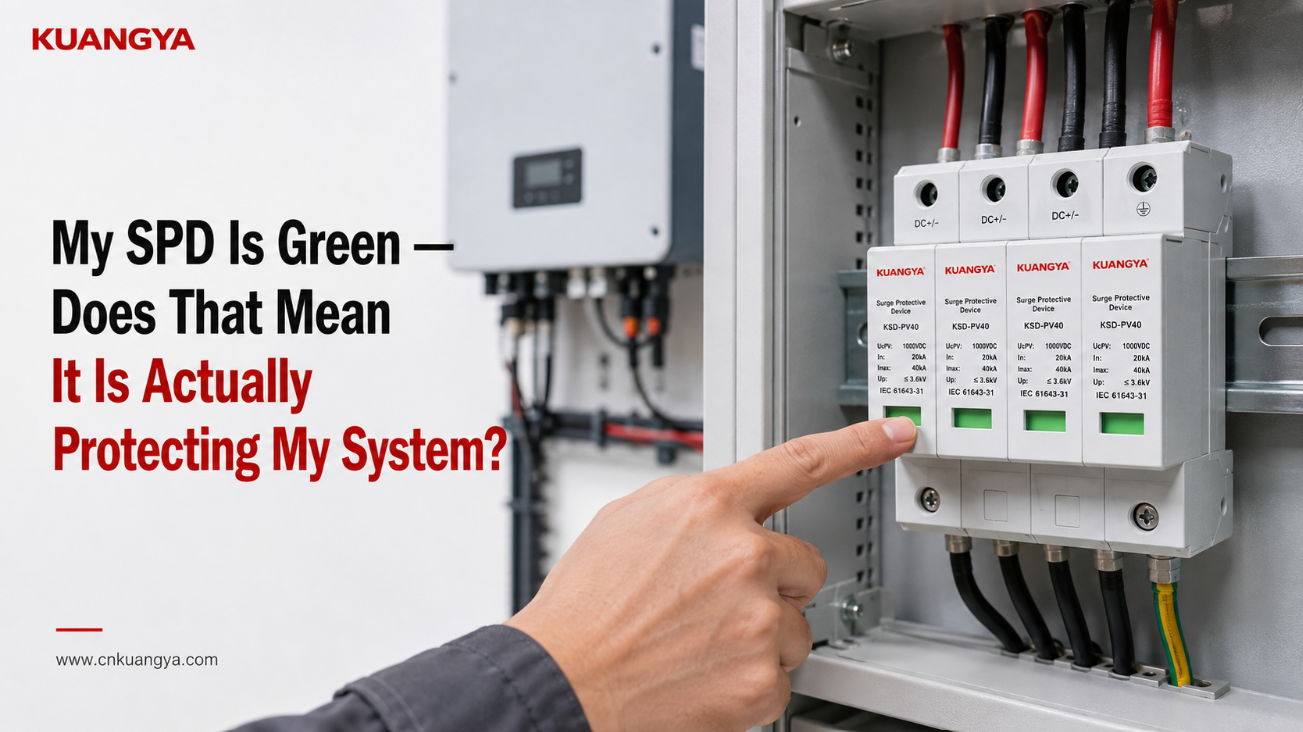
太陽光発電用配電盤を開き、サージ保護デバイスを確認すると、緑色のインジケーターが点灯しています。. SPDの緑色のインジケーターは正常に見えますが、それはシステムが実際に保護されていることを意味するのでしょうか?
すべてが正常に見えます。.
では、そのSPDがインバーターやその他のPVシステムを確実に保護していると言えるのでしょうか?
必ずしもそうではない。.
多くのモジュール式サージ保護デバイスにおいて、緑色のステータスインジケーターは、監視対象のSPDモジュールがメーカー規定の正常または使用可能な状態にあることを示しています。簡単に言えば、デバイスの内部保護素子が切断や交換を必要とする故障状態に達していないことを示しているに過ぎません。.
しかし、その緑色のインジケーターだけでは、保護システムに関するすべてを確認することはできません。.
SPDが正しく選定されているか、配線が適切か、接続経路が長すぎないか、接地および等電位ボンディングの構成が適切か、あるいは過去のサージ発生後にどれだけのサージ耐量が残っているかについては、この表示器では判断できません。.
緑色のウィンドウを理解するための最も安全な考え方は以下の通りです:
緑色は通常、SPDが故障を報告していないことを意味します。これは、サージ保護システムのすべての部品が検証済みであることを意味するものではありません。.
この区別は太陽光発電システムにおいて特に重要です。DC電圧、SPD構成、ケーブル配線、インバータの設置場所、接地構成、および設置方法のすべてが、実際のサージ保護性能に影響を与えるためです。.
メーカーが以下のように定義しているSPDの場合 緑色=正常:
| 表示内容 | 通常示される内容 | 証明されない内容 |
|---|---|---|
| 緑色のインジケーター | 監視対象のSPDモジュールが、定義された故障状態または寿命終了状態を示していないこと | 正しい設置 |
| すべてのモジュールが緑色 | 目視可能なすべての監視対象モジュールが正常状態を報告していること | 正しいSPDの選定 |
| インバータは正常に動作しています | 電力変換は稼働中です | SPDは有効なサージ保護を提供しています |
| 雷雨の後も緑色を表示 | 監視対象の断路器は故障を報告していません | サージは発生していません |
| 長年の使用後も緑色を表示 | 監視対象のモジュールは故障を宣言していません | サージ耐量は完全に維持されています |
| 緑色のウィンドウ表示+アラームなし | 現在、監視対象の故障は報告されていません | 正しい接地、ボンディング、配線、または協調 |
正確な意味については、必ず特定のSPDのデータシートまたは設置説明書で確認してください。.
これが重要な理由は以下の通りです 緑と赤は一般的な表示色ですが、市場に出回っているすべてのSPDにおいて共通の診断言語というわけではありません。.
一部のSPDは機械的なカラーウィンドウを使用しています。その他、LED、シンボル、リモート接点、警報音、または電子監視を使用するものもあります。.
例えば、一部の商用SPDは、 現地の緑/赤のステータス表示とリモート信号機能を備えています。.
そのため、色を判断する前に、まずメーカーが定義する意味を確認してください。.
多くの最新のモジュール式SPDには、酸化亜鉛バリスタ(MOV)などの保護素子と、切り離し機構が組み込まれています。.
通常動作時、MOVベースのSPDは高インピーダンス状態を維持します。.
過渡過電圧が発生すると、保護素子が導通状態となり、 サージ電流を逃がします。 設計された保護経路を通じて、敏感な機器に到達する電圧を制限するのに役立ちます。.
時間の経過とともに、繰り返される電気的ストレス、異常な過電圧、または十分に深刻な事象により、保護素子が劣化する可能性があります。.
したがって、多くのSPD設計には、定義された危険な状態または故障状態に達した保護素子を切り離すための内部遮断機構が組み込まれています。.
目視可能なステータスインジケータは、多くの場合、この監視システムまたは遮断システムに機械的または電気的に連動しています。.
このタイプのSPDの場合:
緑色は以下を示すことがあります:
監視対象の保護モジュールが接続状態にあり、メーカーが定義する故障状態に達していないこと。.
赤色は以下を示すことがあります:
監視対象の保護素子が遮断されているか、またはモジュールが交換を必要とする状態に達していること。.
ただし、正確な動作はSPDの設計によって異なります。.
そのため、次のように表現する方が適切です。
緑色=モジュールが現在、正常な状態であることを報告している。.
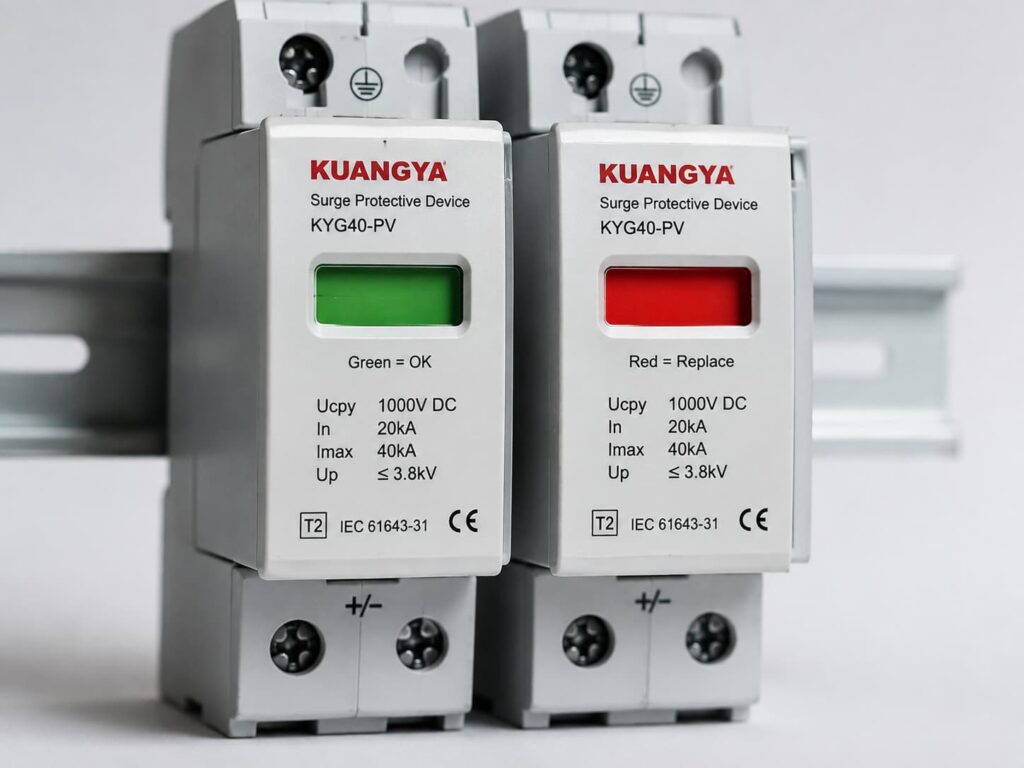
むしろ、次のような表現は避けるべきです。
緑色=電気システム全体が確実に保護されている。.
これは些細なことのように聞こえますが、不必要な混乱を招く原因となります。.
多くのDINレール取り付け型SPDには、実際には緑色のLEDは搭載されていません。.
カートリッジの前面に見える緑色の長方形は、単なる 機械的な状態表示窓である可能性があります。.
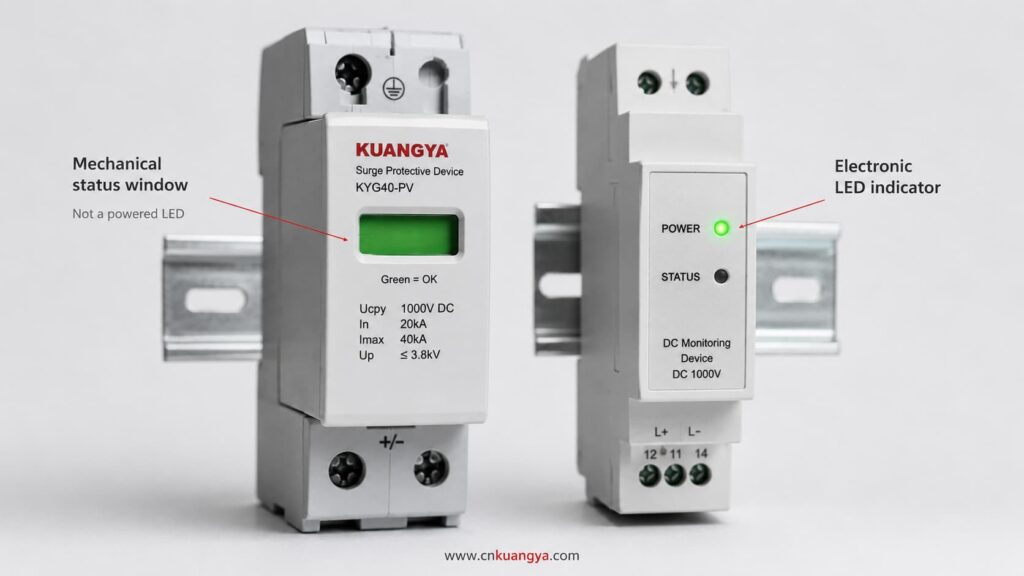
例えば、SPD内部の機構が、内部の断路器が作動した際に色付きのフラグを移動させる仕組みになっていることがあります。.
そのため、電気系統が停電(非通電)状態であっても、表示窓は視認可能なままとなることがあります。.
したがって、以下のような記述は:
“「緑色のライトが点灯しているため、SPDには電源が供給されている」”
不正確である可能性があります。.
機械式の緑色の表示窓は、供給電圧の有無ではなく、SPDモジュールの物理的な状態を示している場合があります。.
製品が以下を使用しているかどうかを常に確認してください:
製品のドキュメントにこれらが明記されている必要があります。.
これは理解しておくべき最も重要なポイントの一つである。.
一般的な電力システムの用途において、SPDは 並列に 保護対象の回路に対して接続されている。.
通常、インバータの定常動作電流はSPDを流れない。.
通常の電圧条件下では、SPDはほとんど動作しない。.
過渡過電圧が発生した際、SPDはサージ電流の経路を提供し、設計値に従って電圧を制限する。.
この並列配置により、SPD保護モジュールが切り離された状態でも主回路は動作を継続できます。.
その結果、以下の状況が発生する可能性があります:
インバータ:正常動作
PV発電:正常
SPDモジュール:故障または切り離し状態
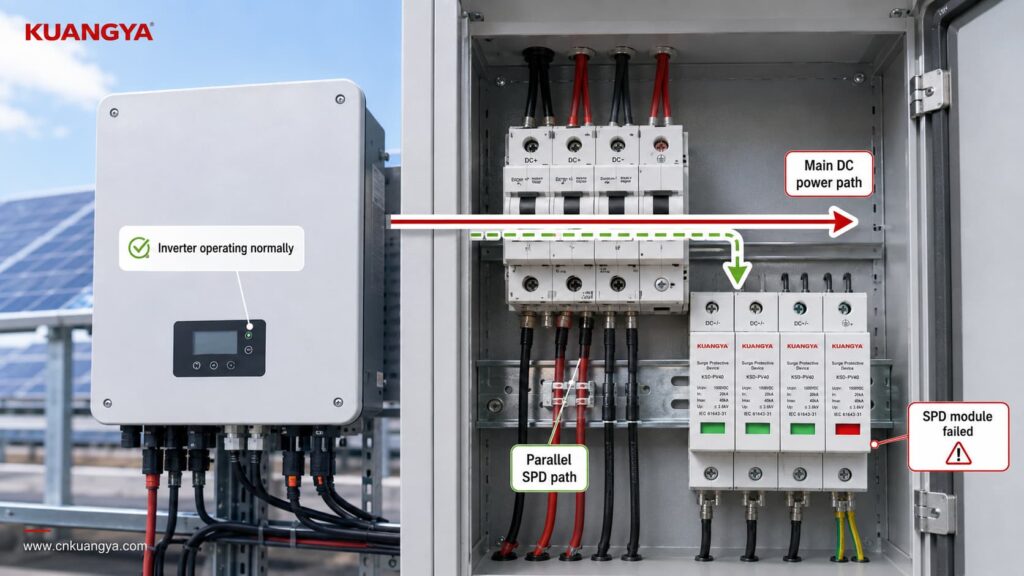
このため、インバータが稼働しているかどうかの確認だけでは、サージ保護機能が有効であるかどうかを判断することはできません。.
PVシステムは、サージ保護経路の1つが失われた後でも発電を継続することが可能です。.
まさにそれこそが、ステータスインジケーターが重要である理由です。.
しかし、その逆もまた真なりです。
A green indicator does not prove that the complete surge protection arrangement is correct.
Think of the indicator as answering one narrow question:
Has the monitored SPD module entered the failure state that this indicator is designed to detect?
It is not answering every engineering question about the installation.
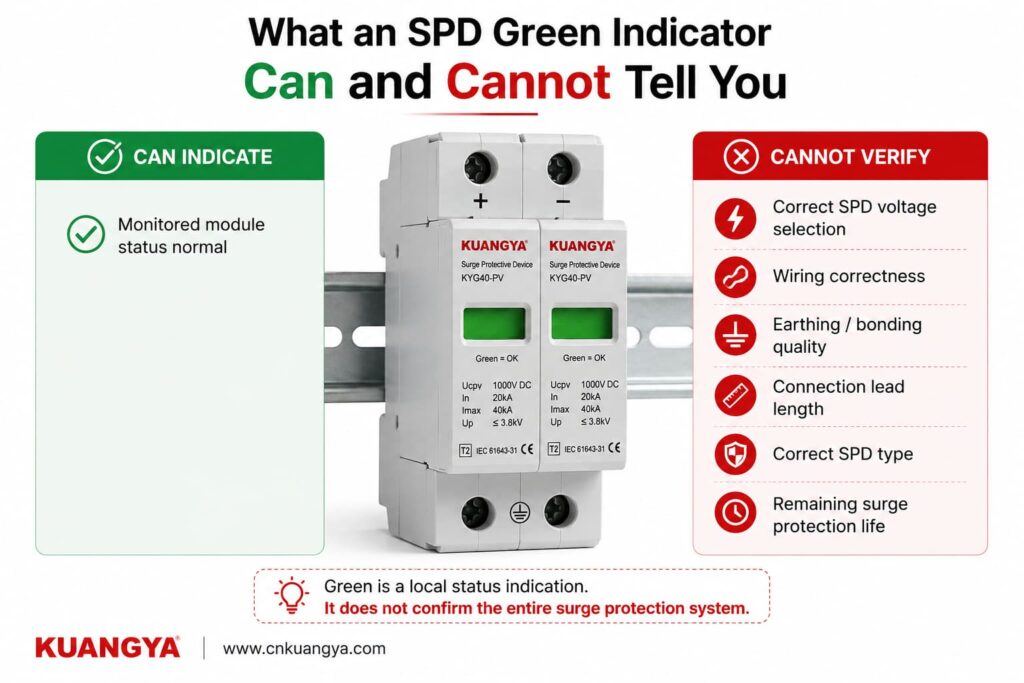
The module has not reached its manufacturer-defined indicated failure state.
The internal disconnection/status mechanism has not reported the condition associated with replacement.
The module is not currently displaying its normal visual failure warning.
Whether the SPD voltage rating is suitable for the PV array.
Whether the SPD is intended for AC or DC operation.
Whether the correct Type 1, Type 2 or combined Type 1+2 protection has been selected.
Whether the voltage protection level is suitable for the equipment being protected.
Whether the SPD is wired according to the correct PV configuration.
Whether all protection modes are connected correctly.
Whether the earthing and equipotential bonding arrangement is correct.
Whether the SPD connection conductors are unnecessarily long.
Whether the required backup overcurrent protection is correct.
Whether a previous surge has reduced the remaining capability of the protection element.
Whether a surge event has occurred.
Whether the SPD would perform exactly as declared during the next transient event.
That is why a green indicator should be treated as one inspection point, not as a complete SPD test.
If the SPD is green, the next question should not be:
“Is everything perfect?”
より適切な問いは次の通りです:
“Does the rest of the installation support the protection that this SPD is designed to provide?”
Here are the most important checks.
Never assume the color meaning only from experience with another brand.
Check the:
For many modular SPDs, green means normal and red means replacement or fault.
But that interpretation should still come from the documentation of the exact product.
This becomes particularly important with multi-function products that may have separate indicators for:
A green indicator is only useful if you know exactly what it is indicating.
A multi-pole SPD can contain several protection modules or protection paths.
For example, a PV SPD assembly may have several cartridges depending on the system topology and protection arrangement.
If three windows are green but one is red, you should not describe the SPD as:
“Basically OK.”
One failed protection path may mean the complete intended protection arrangement is no longer available.
Check every visible status indicator.
For plug-in designs, also make sure the required cartridges are present and correctly installed according to the manufacturer’s instructions.
If one module shows the manufacturer’s defined failure condition, follow the manufacturer’s replacement procedure and investigate whether any additional inspection is required.
A perfectly green SPD can still be the wrong SPD.
This is one of the biggest reasons that green does not equal correctly protected.
For a solar PV installation, check whether the SPD is specifically suitable for the DC side of a photovoltaic system.
IEC 61643-31 addresses SPDs intended for the DC side of PV installations up to 1500 V DC.
The SPD should therefore be selected according to the actual system rather than simply according to appearance or nominal voltage.
Important parameters may include:
System application
AC SPD and PV DC SPD are not automatically interchangeable.
最大連続使用電圧
For PV SPDs, the selected continuous voltage rating must be suitable for the maximum voltage that can occur in the PV circuit under the applicable design conditions.
Voltage protection level — Up
A lower Up generally means a lower declared residual voltage during the specified test conditions, but it must be considered together with system voltage, SPD type and coordination.
Discharge current ratings
Depending on the SPD classification, datasheets may specify values such as In, Imax or Iimp.
SPDタイプ
If these markings are unfamiliar, see our guide to DC SPD specifications such as Ucpv, In, Imax, Up and Iscpv.
Whether Type 1, Type 2 or a combined Type 1+2 SPD is appropriate depends on the installation, lightning exposure, lightning protection concept and applicable standards.
A green Type 2 SPD cannot turn itself into a Type 1 SPD simply because the indicator looks normal.
Correct application still matters.
An SPD only works through the electrical paths actually connected to it.
A green indicator cannot detect every wiring error.
In a PV installation, the SPD connection must match the system architecture and the manufacturer’s wiring diagram.
Do not assume that every DC SPD is wired identically.
Different products and PV system configurations can use different protection arrangements.
Incorrect connections can result in a situation where:
The SPD itself appears normal, but the surge protection path is not the path the system actually needs.
Polarity, protection modes, terminal identification and connection to PE or the relevant equipotential bonding system must follow the device instructions and system design.
The front indicator usually does not verify all of these installation details.
Even when an SPD is correctly selected and still green, installation geometry matters.
During a surge, current changes extremely quickly.
The inductance of the connecting conductors can therefore create additional voltage.
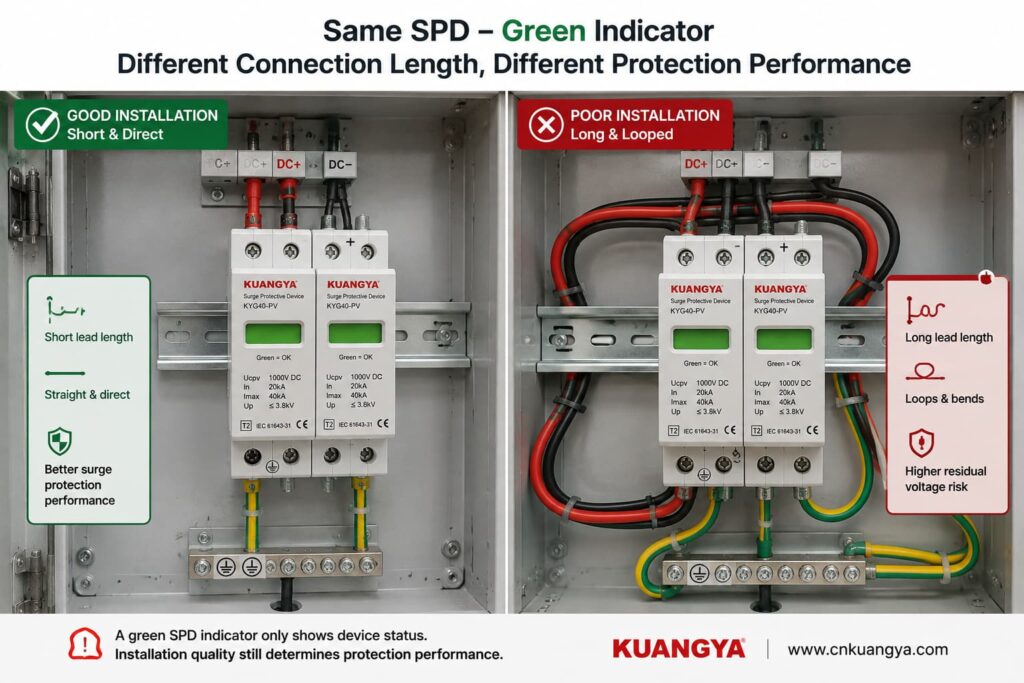
Long, looping or poorly routed SPD conductors can increase the voltage appearing at the protected equipment during a transient.
This means two identical green SPDs can provide different real installation performance if one has short, direct connections and the other is connected using unnecessarily long conductors.
This is why SPD installation instructions commonly emphasize short and direct connections.
したがって:
Green tells you about the monitored SPD module. It does not tell you whether the wiring around the SPD is optimized for surge performance.
If you want to understand this issue in more detail, see our guide:
An SPD does not work in isolation.
The complete surge-current path matters.
Depending on the system topology and SPD design, this can involve PE conductors, bonding conductors, equipotential bonding and the installation’s earthing arrangement.
A green SPD indicator usually does not verify the quality of those external connections.
Possible installation problems can include:
loose connections,
corroded connections,
incorrect bonding,
poor conductor routing,
connection to the wrong reference point,
or an installation arrangement that does not match the SPD wiring diagram.
For solar PV systems, the correct earthing and bonding arrangement depends on the system design and applicable installation requirements.
Therefore, avoid the overly simple statement:
“An SPD just sends everything into the ground.”
The real current paths depend on SPD topology and system configuration.
What matters is that the SPD is installed according to its declared protection modes and the applicable electrical design.
Depending on the product and installation, the SPD manufacturer may specify backup overcurrent protection or coordination requirements.
A green window does not confirm that the required upstream protective device has been selected correctly.
Check the exact product instructions.
Also inspect the SPD externally where this can be done safely.
Warning signs include:
Visible damage should not be ignored simply because the status window still appears green.
Where inspection requires opening energized equipment or accessing hazardous terminals, the work should be performed by qualified personnel following appropriate electrical safety procedures.
An SPD green indicator is useful, but it is only one part of the picture.
Use the checker below as a basic installation review, not as an electrical test or certification of the SPD.
Answer these quick questions to review the basic condition of your SPD installation.
Does the manufacturer documentation confirm that green means normal / available for this SPD?
Are all required SPD modules showing their normal status?
Is the SPD suitable for the actual application and system voltage, such as PV DC use where applicable?
Has the SPD wiring been checked against the manufacturer’s connection diagram?
Are the SPD connection conductors kept short and direct according to the installation instructions?
Has the required earthing / bonding arrangement been checked?
Is the SPD free from visible signs of burning, cracking, deformation or overheating?
The result should be treated as an inspection prompt.
It cannot reproduce an IEC surge test, measure remaining MOV life or guarantee protection against a future lightning event.
This is another very common misunderstanding.
Imagine that a thunderstorm passes near the PV installation.
The inverter continues operating.
You inspect the SPD.
It is still green.
Does this mean the surge never reached the system?
そうだ。.
A surge can occur without forcing the SPD into its failure state.
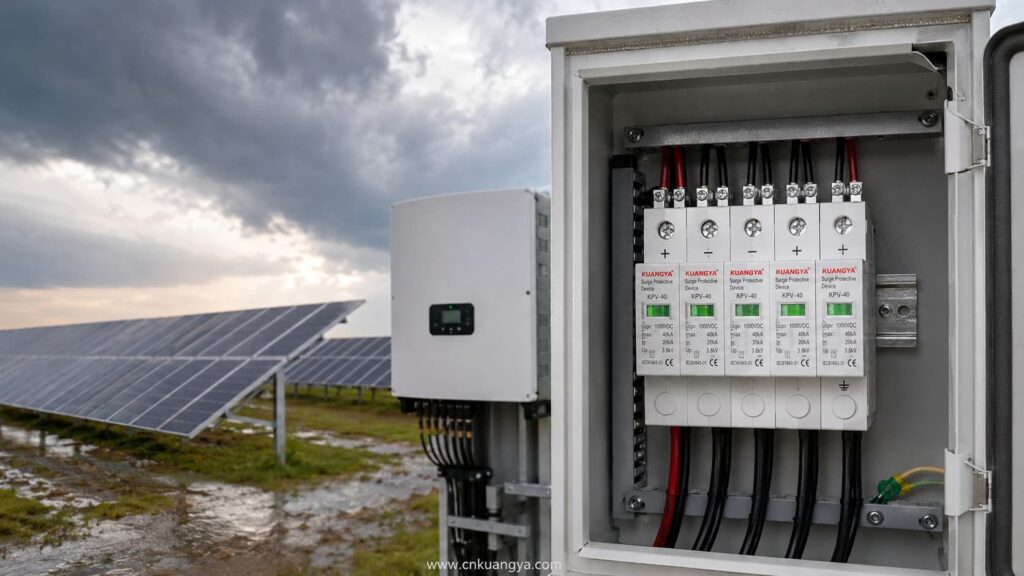
That is the purpose of an SPD: it is designed to withstand and handle transient events within its declared capabilities.
So an SPD may experience a surge, perform its protective function and remain in its normal indicated state afterward.
The green indicator is not normally an event counter.
It does not necessarily tell you:
Some more advanced monitoring systems can record surge events or estimate device condition.
A basic green/red status window usually cannot.
したがって:
Green after a storm does not prove that nothing happened. It only tells you that the SPD has not entered the failure state represented by that indicator.
For important or critical systems, follow the manufacturer’s inspection recommendations after significant electrical or lightning events.
Potentially, yes.
This is one of the reasons not to describe the green window as a complete health measurement.
MOV-based surge protective elements can experience cumulative electrical stress.
The amount of degradation depends on factors such as:
However, this does ない mean that you can calculate SPD life simply by counting thunderstorms.
There is no reliable universal rule such as:
“An SPD survives exactly 20 surges.”
または:
“Replace every SPD after three years.”
Surge exposure is not identical from event to event.
A large event and a small transient do not impose the same electrical stress.
The green/red mechanism is usually a threshold-type status indication, not a precise remaining-life meter.
More sophisticated monitoring systems can provide additional condition information, but a basic mechanical indicator normally cannot show a percentage such as:
SPD life remaining: 63%.
So avoid any tool or article claiming to calculate exact SPD remaining life from only age, number of storms or visual indicator color.
そうだ。.
It is better to say that the monitored SPD has not reached the condition that causes its status mechanism to indicate failure.
That is different from saying the protection element is identical to a brand-new component.
The SPD may have experienced previous stress without reaching its disconnection threshold.
For normal installations, this does not automatically mean the SPD must be replaced.
The important point is simply that the green indicator is not a laboratory measurement of every electrical characteristic inside the SPD.
A normal multimeter can be useful for certain electrical checks, but it cannot fully verify surge-protection performance.
A standardized SPD test involves transient conditions that an ordinary handheld multimeter does not reproduce.
For example, a multimeter does not apply standardized surge-current waveforms to determine parameters such as the SPD’s declared voltage protection level or impulse-current performance.
For many MOV-based SPDs, measuring resistance at the low voltage produced by a multimeter may simply show a very high resistance or open-circuit-like reading.
That alone does not prove the SPD will perform correctly during a surge.
Similarly:
Continuity = good SPD
is not a universal test rule.
For products with a remote signaling contact, a meter may sometimes be used to check that contact when the manufacturer permits it and the circuit is safely isolated.
But the remote contact still only reports the status designed into the device.
It does not perform a full surge test.
For installed SPDs, follow the manufacturer’s inspection and testing procedure.
Some SPDs include a dry contact or changeover contact for remote status monitoring.
This is useful in:
The remote contact can be connected to monitoring equipment such as a PLC, BMS, inverter monitoring system or SCADA system.
If the SPD changes to its defined fault condition, the remote contact can trigger an alarm.
This solves an important practical problem:
Without remote monitoring, a failed SPD may remain unnoticed inside a cabinet for a long time.
However, remote signaling has the same fundamental limitation as the local indicator.
It can report the condition the SPD is designed to monitor.
It normally does not automatically tell you:
So remote monitoring improves visibility, but it does not replace correct engineering.
A green SPD deserves further inspection when something else about the installation creates doubt.
例を挙げよう:
Follow the equipment manufacturer’s post-event inspection instructions.
A previously correct SPD can become poorly coordinated after changes to the PV array, inverter, distribution board, cabling or protection scheme.
Check the product data rather than relying on the green indicator.
Review SPD placement and connection length.
Do not let a green window override obvious physical warning signs.
Repeated SPD failure may indicate a system problem such as incorrect voltage selection, temporary overvoltage, wiring problems or abnormal electrical stress.
Simply installing another identical cartridge repeatedly is not a root-cause solution.
The clearest replacement condition is when the manufacturer-defined status indicator shows that the module has failed or reached end of life.
For many replaceable modular SPDs, this is shown by a red status window.
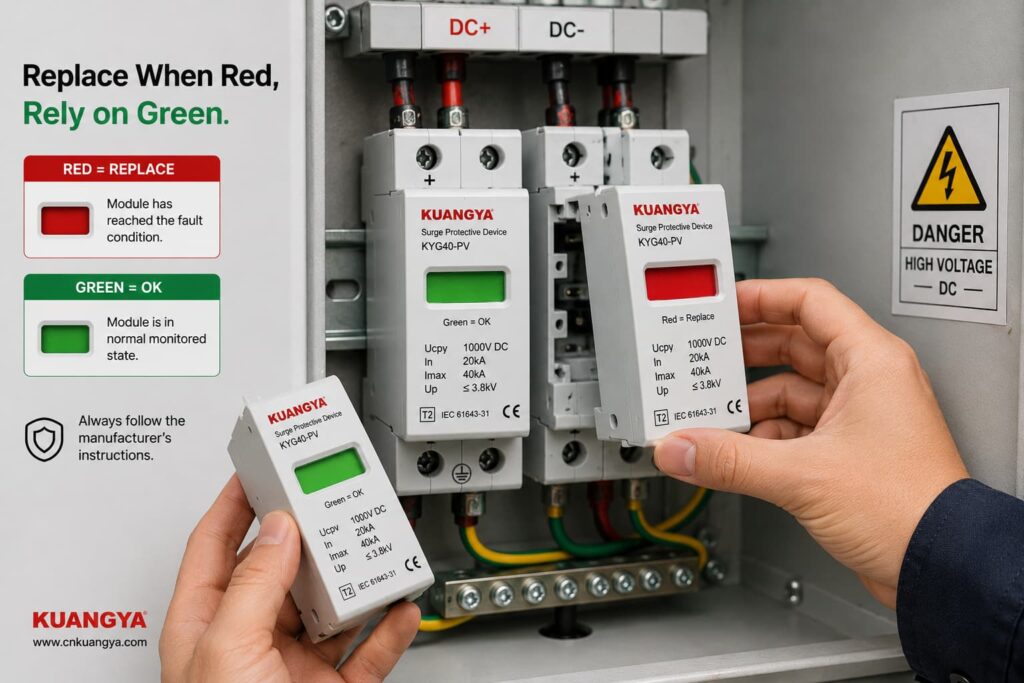
For solar PV applications, you can also view our DC surge protective device range for PV systems, including Type 2 and Type 1+2 models with replaceable modules and visual status indication.
Follow the exact manufacturer’s instructions regarding whether to replace:
Replacement may also be required when there is physical damage or when the manufacturer’s inspection procedure identifies another reason to remove the device from service.
Do not bypass an internal disconnector or attempt to repair a sealed SPD protection cartridge unless the manufacturer specifically provides an approved service procedure.
Consider a 1000 V-class solar PV system with a DC SPD installed close to the inverter.
The SPD windows are all green.
What can we conclude?
We can reasonably say:
The visible monitored SPD modules currently report their normal state, assuming the product documentation defines green as normal.
But before saying:
“The inverter is fully protected.”
we would still want to know:
Is the SPD specifically rated for PV DC use?
Is its maximum continuous operating voltage suitable for the PV array’s maximum design voltage?
Is the correct SPD Type installed for the lightning protection concept?
Does the wiring follow the manufacturer’s PV connection diagram?
Are all protection modes connected?
Are the conductors short and direct?
Is the earthing/bonding arrangement correct?
Is required backup protection installed?
Are all cartridges seated and undamaged?
Only after those questions have been considered does the green indicator become part of a more complete protection assessment.
Suppose a PV array has an SPD in the combiner box.
It is green.
The inverter is located a considerable cable distance away.
Can we simply say:
“There is already a green SPD, so the inverter is protected.”
Not automatically.
The question is no longer only about SPD condition.
It also becomes a question of SPD placement, cable length, protection coordination and whether additional protection is required near the equipment.
This is why SPD status and SPD system design should be treated as two different questions:
Question 1: Is the installed SPD module showing normal status?
Question 2: Is the surge protection system designed and installed correctly?
Green can help answer Question 1.
It cannot answer Question 2 by itself.
For PV systems, several IEC documents are particularly relevant.
IEC 61643-31 covers requirements and test methods for SPDs intended for the DC side of photovoltaic installations, including systems up to 1500 V DC.
IEC 61643-32 provides principles for selecting, installing and coordinating SPDs used in photovoltaic systems.
IEC 60364-7-712:2025 addresses electrical installation requirements associated with solar photovoltaic power supply installations.
The exact standard editions and national requirements used for a project should be confirmed for the market and installation.
The important practical point is that SPD performance is evaluated as more than simply:
green or red.
Selection, ratings, system configuration and installation all matter.
Not exactly.
During normal conditions, the SPD is primarily in a standby state.
It responds when transient voltage conditions require it.
Green normally indicates a status condition, not that the SPD is continuously conducting surge current.
そうだ。.
An SPD can handle a transient event and remain in its normal state.
A basic indicator usually does not record every surge event.
そうだ。.
Because the SPD is typically connected in parallel, the protected equipment may continue operating even if one protection element has been disconnected.
そうだ。.
The SPD’s visual indicator generally does not verify the entire external earthing and bonding system.
そうだ。.
A normal status window should not be interpreted as a precise measurement of remaining surge capacity.
そうだ。.
Incorrect voltage selection, wiring, conductor length or protection coordination can exist while the status indicator still appears normal.
If the manufacturer defines green as the normal status, it usually means the monitored SPD module has not indicated its defined failure condition.
It does not by itself prove that the complete installation is correctly designed or that the SPD retains exactly the same characteristics as when it was new.
It is a positive status indication, but not sufficient evidence by itself.
You should also confirm the correct PV DC SPD rating, installation configuration, conductor routing, bonding arrangement and protection coordination.
そうだ。.
An SPD may handle a transient event without reaching its failure threshold.
A green indicator after a storm therefore does not prove that no surge occurred.
Visible or abnormal physical conditions should always be investigated.
A green indicator monitors only the conditions designed into that status mechanism.
It should not override evidence such as burning, cracking, overheating or other damage.
For many modular SPDs, red means that the monitored protection module has reached the manufacturer’s defined fault or end-of-life state and requires replacement.
Always confirm the meaning in the documentation for the exact model.
The intended protection arrangement should not be assumed to be complete.
The affected module or protection mode needs to be identified and the manufacturer’s replacement and inspection instructions followed.
Not automatically.
Follow the manufacturer’s inspection and replacement instructions.
Check the status indication and any remote monitoring information after significant events, particularly for critical installations.
Not accurately from the indicator color, SPD age or number of thunderstorms alone.
Surge severity varies considerably, and a simple green/red indicator is not a remaining-life meter.
A standard multimeter cannot reproduce standardized surge conditions or verify the complete surge-performance ratings of an SPD.
Use manufacturer-approved inspection or test methods.
No electrical protection device should be treated as permanently maintenance-free simply because its indicator remains green.
Include SPD status in the installation’s appropriate periodic inspection and maintenance process according to manufacturer instructions and local requirements.
Seeing an SPD green indicator is generally a positive sign when the manufacturer defines green as the normal operating status.
But it should be interpreted correctly.
For an SPD whose manufacturer defines green as normal, the safest conclusion is:
The monitored SPD module has not reported its defined failure condition and remains in its indicated available state.
That is useful information.
It is not the same as proving that the complete surge protection system is perfect.
Real protection also depends on:
correct SPD selection,
correct voltage rating,
appropriate SPD Type,
proper wiring,
short and direct connections,
correct earthing and bonding,
バックアップ保護,
coordination,
and the physical condition of the installation.
So the next time you look at a green SPD, do not ask only:
“Is the indicator green?”
と尋ねている:
“Is the SPD green — and is the entire protection path designed and installed correctly?”
That is a much better way to judge whether your solar PV system is truly prepared for transient overvoltages.

